
Upgrading from version 21.05 and above

Direct upgrade is possible from version  21.05  onwards, using the ProactivePack console :

-       ProcureDownload the zippatch file
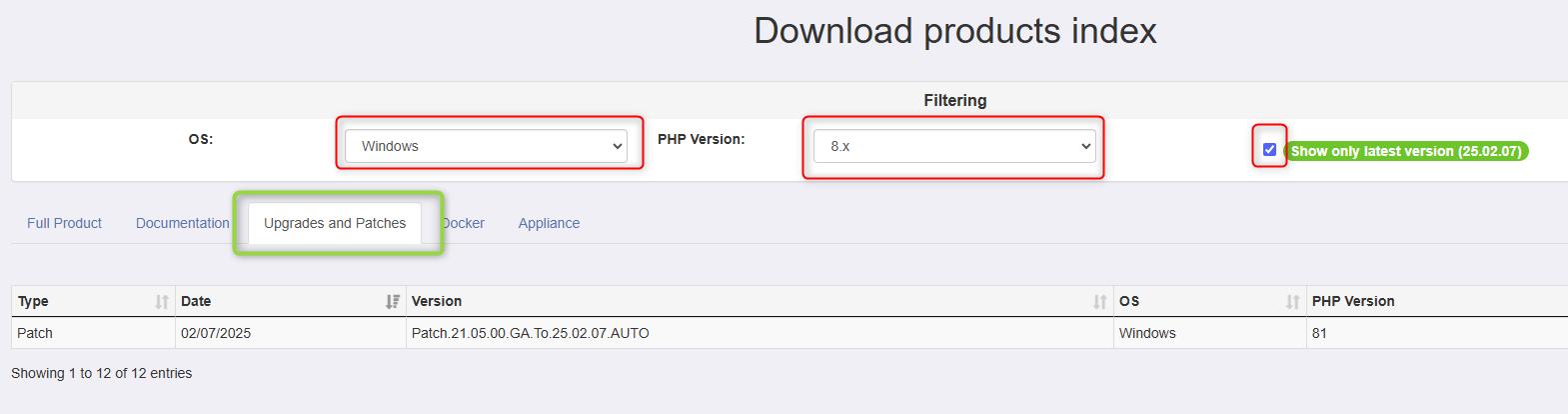
corresponding
    Go to our download site https://dowloads.proactivepack.com : Go to the "upgrade and patches" table Select the platform (Windows or Linux) that corresponds to your platformenvironment andSelect the PHP version fromthat ProactivePackcorresponds supportto your environment. In doubt you can find it in the "About" page of ProactivePack. Optionally select the "Show only last version" tick-box. Download the patch file that you need.

    image.png

         Make sure to download a patch file (typically prefixed PPACK_Patch_XXXX) and not a full version

    Applying the patch file

    -       As a ProactivePack administrator, navigate to Administration -> Modules -> Global

    -       Use the context menu and select :
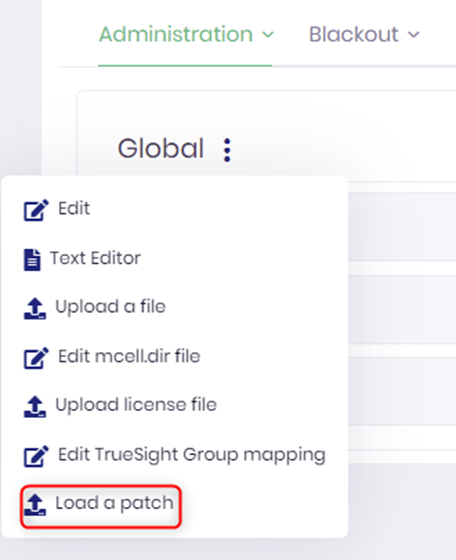
     

    -       In the next dialog, supply the path to the zip file and confirm.

    i Do not interrupt the upload process