Installation guidelines
Configuring access to Monityr-X
Creating the Blackout dictionaries
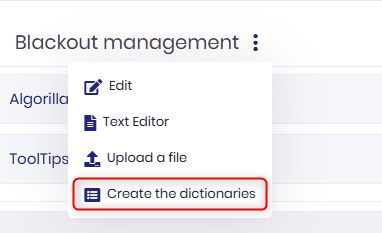
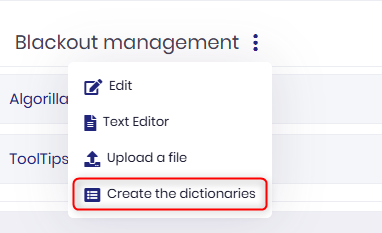
Navigate to Administration -> ProactivePack -> Modules -> Blackout Management.
Right-click on the 3-dots menu and select "Create the dictionaries" :
Adding the blackout rules to the rule engine
A series of entries (rules) must be added to the "MOMAPythonRules" Monityr-X dictionary. Contact ProactivePack support to obtain the latest data.
Adding the rules library to the StreamSets container
From the ProactivePack distribution, navigate to $PPACK_HOME/Tools/streamsets/ and extract the files ppack_rules.py and ProactivePack.conf
Copy these two files to the StreamSets container in the directory /opt/streamsets-datacollector/streamsets-libs-extras/python_rules
In that same directory, edit the file __init__.py and add the following lines :
# ProactivePack rules
from .ppack_rules import *
4. Restart the corresponding StreamSets pipelines to load the library
Library configuration
The file ProactivePack.conf (see above) contains a series of parameters to configure some options of the rule engine
Parameter
Content
TraceDir
Directory location of the ProactivePack rules trace file
TraceFile
Name of ProactivePack rules trace file
TraceLevel
Number from 1 to 5 indicating the trace verbose level (1= minimal, 5 = maximal, should NOT be used in production)
BOAfterCheckMinutes
Tolerance time window (in minutes) after a blackout is over to compute the status of an event when it exists blackout. Do not change unless advised by ProactivePack support
BOBeginCheckMinutes
Tolerance time window (in minuts) when a blackout starts to compute the status of an event when it enters blackout. Do not change unless advised by ProactivePack support