
Defining and running tests

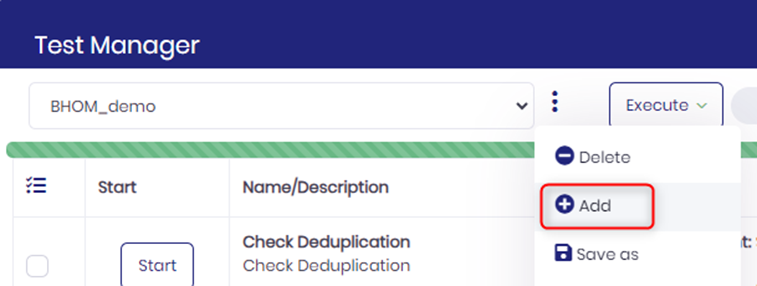
1.       You define Test sets by adding a new “test set” from the Test Manager main window :


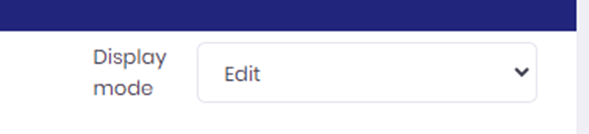
2.       Once your test set is created, switch to the “Edit” display mode in the main window :


3.       In the “Edit” window you can :

a.       Add a new empty test to the set by pressing the “Add an empty test to set” button

b.       For each test in  the test

                                                               i.      Edit the name/description by double-clicking on the test “Name/Description” cell

                                                             ii.      Edit the actions by double -clicking on the test “action(s)” cell

                                                           iii.      Edit the checks by double-clicking on the test“check” cell

c.       Reorder your tests by dragging and dropping tests above/below each other.

4.       Each “action” or “check” includes :

a.       A name and a description

b.       A function – see table below.


Function

Description

Arguments

Comments

BMC TrueSight Operations

TSOM – send event(s) or data

Send event(s) or data to a TSOM cell

    Cell Name

    Type

    Input File Name

    Input File Format

    Multiple events/data can be provided, input format must be BAROC

    TSOM – get record

    Get a global record value from a TSOM cell

      Cell Name

      Record Name


      TSOM – set record slot

      Set a global record value from a TSOM cell

        Cell Name

        Record Name

        Slot Name

        Slot Value


        TSOM – compare slots

        Check the value of an event slot in a TSOM cell.

          Cell Name

          Slot Name

          Operator

          Slot Value

          See below on how to reference test events in the Slot Name

          TSOM – drop test data

          Delete all test data sent from Test Manager

            Cell Name


            TSOM – close test events

            Close all TSOM test events sent from Test Manager

              Cell Name


              BMC HELIX Operations

              BHOM – send event

              Send event(s) to BHOM

                HELIX environment

                Input File Name

                Input File Format

                Multiple events/data can be provided, input format can either be BAROC or JSON

                BHOM – compare slots

                Check the value of an event slot in a TSOM cell.

                  HELIX environment

                  Slot Name

                  Operator

                  Slot Value

                  See below on how to reference test events in the Slot Name

                  BHOM – close test events

                  Close all BHOM test events sent from Test Manager

                    HELIX environment


                    MOMA-IT

                    MOMA - send event

                    Send event to MOMA

                      MOMA environment Input File Name Input File Format


                      MOMA - send dictionary data

                      Send data into a MOMA dictionary

                        MOMA environment Dictionary name Input File Name Input File Format


                        MOMA – compare slots 

                        Check the value of an event slot in MOMA

                          MOMA environment SlotName SlotOperator SlotValue

                          See below on how to reference test events in the Slot Name

                          MOMA – close test events

                          Close all MOMA test events sent from Test Manager


                          Wait

                          Wait for a specific duration

                          Duration


                          BigPanda

                          BigPanda – send event

                          Send event(s) to BigPanda

                            BigPanda environment Input File Name Input File Format


                            BigPanda – compare slots 

                            Check the value of an event slot in BigPanda

                              SlotName SlotOperator SlotValue

                              See below on how to reference test events in the Slot Name

                              ServiceNow

                              Check incident value

                              Verify incident value in ServiceNow

                                Event Slot Relation Incident Slot Name Slot Operator Incident Slot Value

                                Used to check if an incident created from an event has a specific value.

                                The incident number must be present in the "event slot relation" slot so it can be retrieved.

                                Generic

                                Run Command

                                Run an arbitrary command

                                Command Line


                                Ask user validation

                                Manual user confirmation of a specific item


                                E.G. : Check if email has been received

                                Wait

                                Set a delay

                                Time (in seconds)


                                Wait until event

                                Wait (with a time out) on the arrival of an event

                                  Event Index Check frequency Time out

                                  Used to wait until an event has arrived.


                                  For slot value comparison operations, the “Slot Name” argument may have a prefix to identify for which event from the test set the comparison should be done.

                                  To do this, we can distinguish:

                                  -          The index of the test in the test set : “X”

                                  -          The index of the action in the test : “Y”

                                  -          The index of the event in the action : “Z”


                                  For example, if in the following test set we have the following test :



                                  -          The Test Index is X=6.

                                  -          The action index of the first action “Send 2 MINOR events” is Y=1

                                  -          The action index of the second action “send a OK event” is Y=2

                                  -          The event index of the first event of the first action is Z=1.


                                  So, to reference a slot of a specific event, the following notations are supported :

                                  Within the same test:

                                  SlotName

                                   First event in first action in current test

                                   (note : this is equivalent to EVENT1.SlotName)

                                  EVENTY.SlotName

                                   First event from action Y in current test

                                  EVENTY.Z.SlotName 

                                   Event Z from action Y in current test


                                  If you need to reference an event from another test in the test set:

                                  EVENT.X.Slotname

                                  First event from first action for test index X

                                  EVENT.X.Y.Slotname

                                  First event from action Y for test index X

                                  EVENT.X.Y.Z.Slotname

                                  Event Z from action Y for test index X